Flattening
AVX2
This feature uses AVX2 instructions.
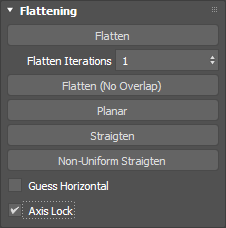
Flattening uses several methods to properly optimize the UV shells by minimizing the distortion of the UV shell.
Flatten
Flatten is an optimization algorithm which purpose is to optimize a UV shells to minimal distortion. Flatten has three different modes.
Face Selection
In face selection mode, you can optimize a UV shell without constraints. This means that the boundaries are completely free to move.
Soft Seleciton in Face Mode
When using Soft Selection you can reweight the importance of each area of the UV shell, so you can control which area should be bigger on the UV shell, leading to better texel density. This is especially important in case or organic models, like a face, where the nose and chin area often lacks of resolution. With this method you can increase the Texel Density of these areas.
Area Preservation
This way the system autmatically figures out those area where the above correction is necessary and applies the process on the model in each iteration.
Note
Area Preservation and Soft Selection based reweighting can be used together as well
Edge Selection
In edge mode, you can lock edges and edge vertices to lock to an axis. The locking axis determined by the angle of the edge and the axis. So if it's closer to the horizontal edge is angle, then it's locked to the horizontal, if it's closer to the vertical, then it's locked to the vertical axis.
Vert Selection
Vertex selection completely locks a vertex in place. In this mode the vertices can't move in either axis. This is called a vertex pinning.
Flatten Iterations
Flatten iterations determine how many times the optimization part of the flatten algorith will run. More iterations take longer, but gives a better result. Normally 5-10 iterations are enough to get a proper result.
Flatten (Non-Overlap)
This is a standalone algorithm, and it has no properties. Non-Overlapping Flatten iterates as along as it's necessary to produce a completely optimized result. This algorithm uses AVX2 instructions.
Flatten vs Flatten (No Overlap)
The difference between the two method is that Flatten (No Overlap) prevents all self intersections, even from not adjacent faces.
Planar
Simple planar projection, but it's not affecting the existing topology.
Warning
Use UVW map to reset the topology with Planar
Straighten methods
Each straighten method tries to fit the inner vertices into axis aligned seams or selection. The following two version can be used in UVReactor.
Non-Uniform Straighten
Non-Uniform straighten uses the flatten algorithm with axis lock, to figure out the horizontal and and vertical seams. After this the algorithm iterates based on the Flatten iterations to optimize the inner vertices and distortion.
Straighten (quad grid topology based)
This version of straighten is a strict version of the Non-Uniform straighten, which works on any toplogy. This one is numerically much more precise, but only works on grid like quad topology.
Guess Horizontal
If you turn on this checkbox the algorithm after each action, tries to find the best optimal alignment using rotatin calipers. This way the bounding box area to UV shall area will be the best. This helps a lot when it comes to pixel alignment or UV packing.
Axis Lock
Axis Lock turn on the edge axis lock and vertex pinning. Recommended to keep it turned ON.